When setting up a server, Docker is often an essential tool. This guide documents the complete process of installing Docker and Docker Compose on Debian 12, so you can quickly reference it in the future without searching again. Introduction to Docker and Docker Compose Docker is an open-source platform designed for building, deploying, and managing containerized applications. It simplifies application delivery and ensures consistency across environments, making it ideal for managing single containers. Docker Compose is a tool for defining and managing multi-container applications. It is especially useful for scenarios where multiple containers need to interact and be configured together. Docker serves as the foundation, while Docker Compose enhances orchestration and efficiency. Step 1: Update System and Install Required Packages Before installing Docker, update your Debian system and install necessary dependencies:
apt-get update apt-get upgrade -y apt-get install htop apt-transport-https ca-certificates curl software-properties-common -yStep 2: Install Docker Use the official installation script to install Docker:
curl -fsSL https://get.docker.com -o get-docker.sh sh get-docker.sh docker
 Step 3: Add User to Docker Group
To run Docker commands without sudo, add your current user to the docker group:
Step 3: Add User to Docker Group
To run Docker commands without sudo, add your current user to the docker group:
usermod -aG docker $USERStep 4: Install Docker Compose Docker Compose is used for managing multi-container setups. Install it with the following command:
curl -L "https://github.com/docker/compose/releases/latest/download/docker-compose-$(uname -s)-$(uname -m)" -o /usr/local/bin/docker-compose && chmod +x /usr/local/bin/docker-composeStep 5: Verify Installation After installation, verify Docker and Docker Compose by checking their versions:
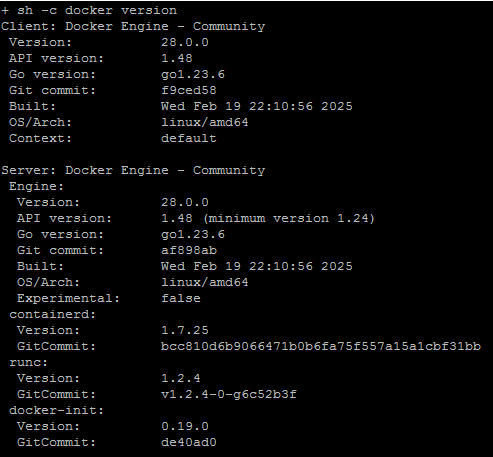
docker --version docker-compose --versionIf you see output similar to the following, the installation was successful:
Docker version 28.0.0, build f9ced58 Docker Compose version v2.33.0Q&A
- What is the difference between Docker and Docker Compose? Docker is used to create and manage single containers, while Docker Compose is designed for orchestrating and managing multi-container applications.
- How to fix permission issues when using Docker? If you encounter permission errors, add your user to the docker group using: usermod -aG docker $USER, then log out and log back in (or reboot).
- Do I need to install Docker Compose separately? Yes, Docker Compose is installed separately (unless using newer Docker versions with built-in docker compose plugin).
- How to verify installation success? Run docker –version and docker-compose –version. If version information is displayed, the installation is successful.