BandwagonHost has officially added support for Ubuntu 26.04 LTS in the KiwiVM control panel. Users can now install or reinstall Ubuntu 26.04 directly from the management interface without manually mounting ISO images.
For most BandwagonHost customers, newly purchased VPS instances are typically deployed with Rocky Linux by default. If you prefer an Ubuntu environment for website hosting, Docker deployment, development projects, or other Linux-based applications, you’ll need to reinstall the operating system through the KiwiVM control panel.
Ubuntu Long-Term Support (LTS) releases are generally published every two years. Following Ubuntu 24.04 LTS, Canonical officially released Ubuntu 26.04 LTS in April 2026, and BandwagonHost quickly integrated support into the KiwiVM platform.
BandwagonHost Official Website:
https://bandwagonhost.com/
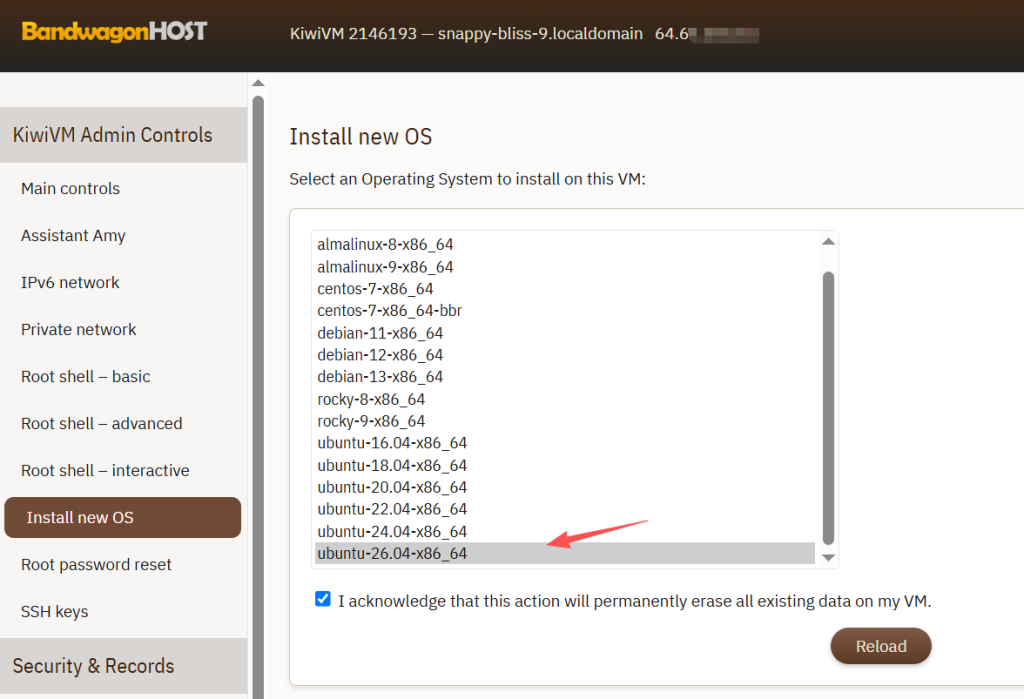
Ubuntu 26.04 Added to the KiwiVM OS List
According to the official BandwagonHost announcement:
Ubuntu 26.04 has been added to the KiwiVM automatic installation OS list and is also available as an official ISO image for manual installation and system recovery.
Release Date:
April 28, 2026
New additions include:
- Ubuntu 26.04 automatic installation template
- Official Ubuntu 26.04 ISO image
- System recovery support
- One-click deployment through KiwiVM
This means users no longer need to upload installation media manually or go through complex installation procedures to deploy Ubuntu.
How to Install Ubuntu 26.04 in KiwiVM
The installation process is very straightforward.
Step 1: Log in to KiwiVM
Access the BandwagonHost client area and open the KiwiVM management panel for your VPS.
Step 2: Open the OS Reinstallation Page
Select:
Install New OS
or:
Install new Operating System
from the control panel menu.
Step 3: Select Ubuntu 26.04
Locate:
Ubuntu 26.04 LTS
from the operating system list and confirm the installation.
Step 4: Reinstall the System
Click the installation button and KiwiVM will automatically reinstall the operating system.
Important notes:
- All existing system data will be erased
- Website files will be deleted
- Databases will be removed
- SSH keys and configurations will be reset
Be sure to create a complete backup before proceeding.
Step 5: Retrieve New Login Credentials
After installation, KiwiVM will display:
- New root password
- SSH login port
- Server IP address
Save this information and connect to the server via SSH.
Ubuntu 24.04 vs Ubuntu 26.04: Which One Should You Choose?
Many users want to upgrade as soon as a new Ubuntu version is released. However, from a long-term server stability perspective, different versions are suitable for different scenarios.
When Ubuntu 24.04 Is Recommended
Ideal for:
- Business applications
- Production websites
- Database servers
- Docker clusters
- Long-term stable deployments
Advantages:
- Extensively tested in production environments
- Mature software ecosystem
- Better driver compatibility
- Large community knowledge base
If your current Ubuntu 24.04 server is running smoothly, there is usually no urgent reason to upgrade.
When Ubuntu 26.04 Is Recommended
Ideal for:
- New VPS deployments
- Testing environments
- AI development platforms
- Users who want the latest features
- Workloads requiring newer kernel support
Advantages:
- Newer software packages
- More advanced system architecture
- Improved hardware compatibility
- Enhanced security features
If you are comfortable with the possibility of minor early-release issues, Ubuntu 26.04 is worth considering.
Major New Features in Ubuntu 26.04 LTS
Ubuntu 26.04 LTS Codename:
Resolute Raccoon
Official Release Date:
April 23, 2026
As an LTS release, Ubuntu 26.04 includes:
- 5 years of security updates
- 5 years of critical maintenance patches
Linux 7.0 Kernel
Ubuntu 26.04 ships with the Linux 7.0 kernel by default.
Compared with previous releases, it provides:
- Improved CPU scheduling
- Better storage performance
- Enhanced container efficiency
- Broader hardware compatibility
GNOME 50 Desktop Environment
The desktop edition now includes:
GNOME 50
Benefits include:
- Smoother animations
- Improved multi-monitor support
- Enhanced HiDPI scaling
- Better touchscreen usability
First LTS Release to Completely Remove Xorg
Ubuntu 26.04 is the first Ubuntu LTS release to remove Xorg sessions entirely.
Only the following remain:
Wayland
and:
XWayland
for compatibility.
Advantages include:
- Better graphics performance
- Improved display security
- Reduced screen tearing
- Enhanced multi-monitor experience
For VPS users, however, this change is largely irrelevant.
APT 3.2 Adds Rollback Functionality
The package manager has been upgraded to:
APT 3.2
New commands include:
apt history-list
apt history-undo
apt history-rollback
Users can now review package history and roll back changes, significantly reducing upgrade risks.
sudo-rs Becomes the Default Implementation
Ubuntu 26.04 introduces the Rust-based:
sudo-rs
as the default sudo implementation.
Benefits include:
- Improved security
- Stronger memory protection
- Reduced risk of traditional C-language vulnerabilities
systemd 259 and cgroup v2
The system now includes:
systemd 259
and completely removes:
cgroup v1
in favor of:
cgroup v2
This provides better support for Kubernetes, Docker, Podman, and other container platforms.
TPM Full Disk Encryption Support
Ubuntu 26.04 introduces support for:
TPM Full Disk Encryption (FDE)
allowing hardware-assisted disk encryption for enhanced system security.
Enhanced AI and Machine Learning Support
For AI developers, Ubuntu 26.04 includes native support for:
- NVIDIA CUDA
- AMD ROCm
This simplifies deployment of:
- AI training environments
- Inference services
- GPU computing platforms
Updated Default Applications
| Software | Version |
|---|---|
| Firefox | 150 |
| LibreOffice | 25.8 |
| Thunderbird | 140 |
| GIMP | 3.2 |
Additionally:
- Showtime replaces Totem
- Resources replaces System Monitor
- Ptyxis replaces the traditional Terminal
Is Ubuntu 26.04 Worth Upgrading To?
If your VPS is currently running:
- Ubuntu 22.04
- Ubuntu 24.04
and operating reliably, it is generally best to stay on your current version.
If you are:
- Deploying a new server
- Launching a new project
- Building a testing environment
then Ubuntu 26.04 is a strong choice.
For production workloads:
Choose Ubuntu 24.04 for maximum stability, and Ubuntu 26.04 if you want the latest features.
BandwagonHost Ubuntu 26.04 FAQ
1. When did BandwagonHost start supporting Ubuntu 26.04?
BandwagonHost officially added Ubuntu 26.04 automatic installation support to KiwiVM on April 28, 2026.
2. Can Ubuntu 26.04 be installed with one click?
Yes.
Simply select Ubuntu 26.04 from the KiwiVM operating system list and start the installation.
3. Will reinstalling the OS delete my data?
Yes.
Reinstallation formats the disk and removes all data. Always back up your files beforehand.
4. Which is more stable, Ubuntu 24.04 or Ubuntu 26.04?
Ubuntu 24.04 has been tested extensively and is generally considered more mature and stable.
Ubuntu 26.04 introduces many new features but is still undergoing broader ecosystem adoption.
5. Can I upgrade directly from Ubuntu 24.04 to Ubuntu 26.04?
Technically yes, using:
do-release-upgrade
However, for VPS environments, a clean reinstall is usually recommended to avoid upgrade-related issues.
6. What are the minimum requirements for Ubuntu 26.04?
Ubuntu Server officially recommends:
- Memory: 1.5GB or more
- Storage: 4GB or more
Most BandwagonHost plans meet these requirements.
For VPS plans with 512MB RAM, adding swap space is recommended.
7. What should I do if SSH stops working after reinstalling?
Check the following first:
- Whether the SSH port has changed
- Whether the root password has been updated
- Whether the firewall allows SSH access
If necessary, use the KiwiVM console to troubleshoot.
8. Will replacing Xorg with Wayland affect VPS users?
No.
Most VPS users manage their servers through the command line and do not use a desktop environment, so this change will have virtually no impact.
Recommended BandwagonHost VPS Plans
For most users in mainland China, the CN2 GIA-E series remains one of the most balanced options in terms of network quality and overall value.
| Plan | CPU | RAM | Storage | Monthly Traffic | Port Speed | Recommended Locations | Price |
|---|---|---|---|---|---|---|---|
| KVM (Entry) | 2 Cores | 1GB | 20GB | 1TB | 1Gbps | DC2 AO, DC8 ZNET | $49.99/year Direct Link |
| KVM Standard | 3 Cores | 2GB | 40GB | 2TB | 1Gbps | US Locations | $52.99/6 months / $99.99/year Direct Link |
| CN2 GIA-E (Recommended) | 2 Cores | 1GB | 20GB | 1TB | 2.5Gbps | DC6, DC9, Japan SoftBank, Netherlands, San Jose, Canada | $49.99/quarter / $169.99/year Direct Link |
| CN2 GIA-E Advanced | 3 Cores | 2GB | 40GB | 2TB | 2.5Gbps | CN2 GIA-E Network | $89.99/quarter / $299.99/year Direct Link |
| HK Plan | 2 Cores | 2GB | 40GB | 0.5TB | 1Gbps | Hong Kong, Tokyo, Osaka, Singapore | $89.99/month / $899.99/year Direct Link |
| HK High-End | 4 Cores | 4GB | 80GB | 1TB | 1Gbps | Hong Kong CN2 GIA | $155.99/month / $1559.99/year Direct Link |
| OSAKA Plan | 2 Cores | 2GB | 40GB | 0.5TB | 1.5Gbps | Osaka CN2 GIA | $49.99/month / $499.99/year Direct Link |
| OSAKA High-End | 4 Cores | 4GB | 80GB | 1TB | 1.5Gbps | Osaka CN2 GIA | $86.99/month / $869.99/year Direct Link |
Conclusion
BandwagonHost has successfully integrated Ubuntu 26.04 LTS into the KiwiVM control panel, allowing users to deploy the latest Ubuntu release with a single click. For users interested in the newest features, AI development environments, and modern project deployments, Ubuntu 26.04 is an attractive option. For production workloads, website hosting, and long-term stability, Ubuntu 24.04 remains the safer choice.
Before upgrading or reinstalling your operating system, always create a complete backup to prevent accidental data loss.