Most AI assistants store your data on official servers, charge per message, and go offline once you close your browser. OpenClaw works completely differently — it runs on your own VPS, can connect to platforms like Telegram, WhatsApp, Slack, and Discord, and stays online 24/7.
Now, AvaHost provides a one-click Ubuntu 22.04 template for installing OpenClaw, allowing deployment to be completed in just a few minutes.
This tutorial will walk you through the complete installation process step by step.
1. What Is OpenClaw?
OpenClaw is an open-source, self-hosted AI assistant.
You can connect it to:
- Claude (Anthropic)
- ChatGPT (OpenAI)
- Ollama local models
Then use it as your personal AI assistant across multiple chat platforms.
Supported Platforms
- Telegram
- Slack
- Discord
- 10+ other chat platforms
Supported Features
- Google Workspace (Gmail / Drive / Calendar)
- Web browsing
- File management
- Executing terminal commands
- API integrations
- Multi-model switching
2. Why Self-Host Your AI Assistant?
Advantages of using OpenClaw with a VPS:
- ✔ All conversation data stays on your own server
- ✔ No per-message charges — only VPS costs
- ✔ Runs online 24/7
- ✔ Freedom to choose AI models
- ✔ Connects to multiple chat platforms
Perfect for:
- Cross-border sellers
- Automated customer support
- AI chatbots
- Personal assistants
- Developers
3. Requirements
Before getting started, prepare the following:
- An AvaHost account
- A VPS (2GB RAM or higher recommended)
- An OpenAI API Key or Anthropic API Key
4. Log In to the AvaHost Control Panel
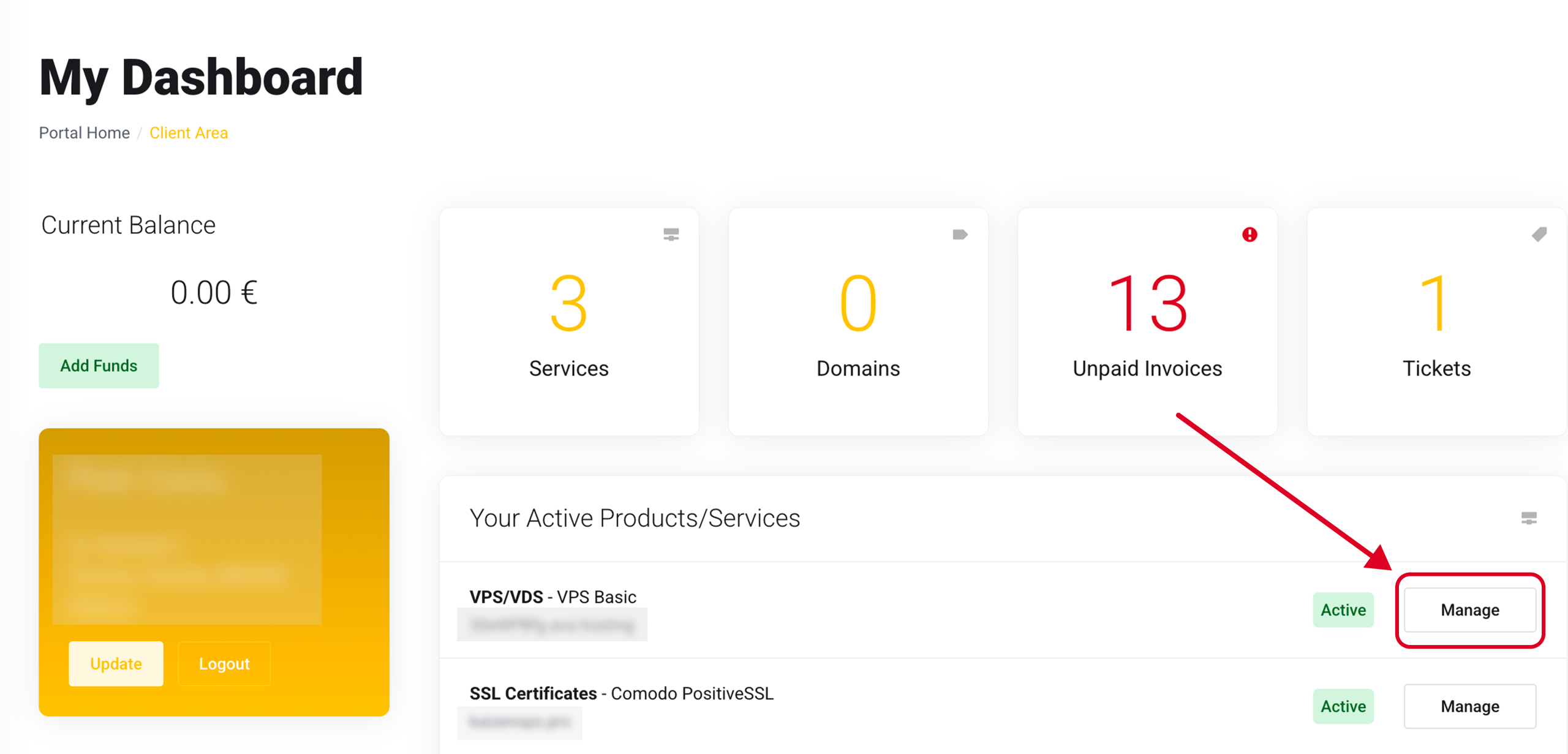
Visit:
https://ava.hosting
After logging in, go to:
My Dashboard
Find:
Your Active Products / Services
Click your VPS → Manage
5. Open the Reinstallation Page
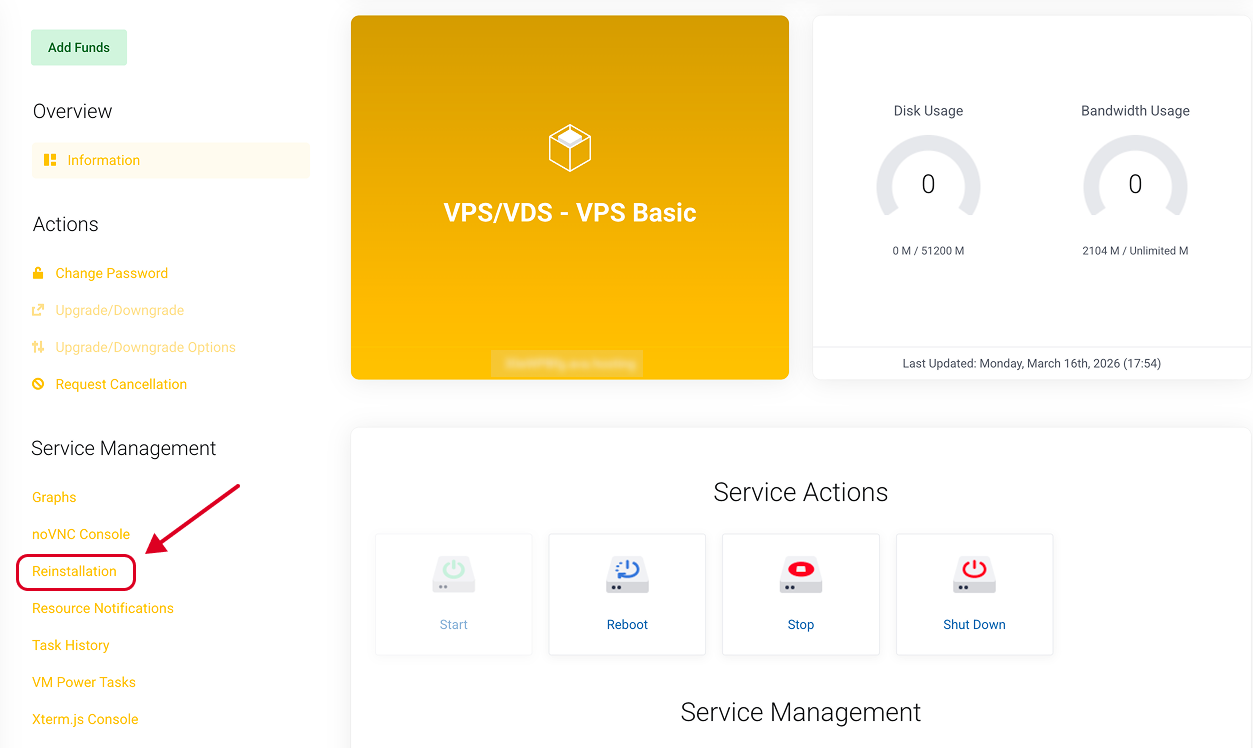
Inside the VPS management page:
Left menu:
Service Management
→ Reinstallation
⚠ Warning
Reinstalling the OS will erase all existing data on the VPS.
For a brand-new VPS, you can proceed directly.
6. Select the OpenClaw Template
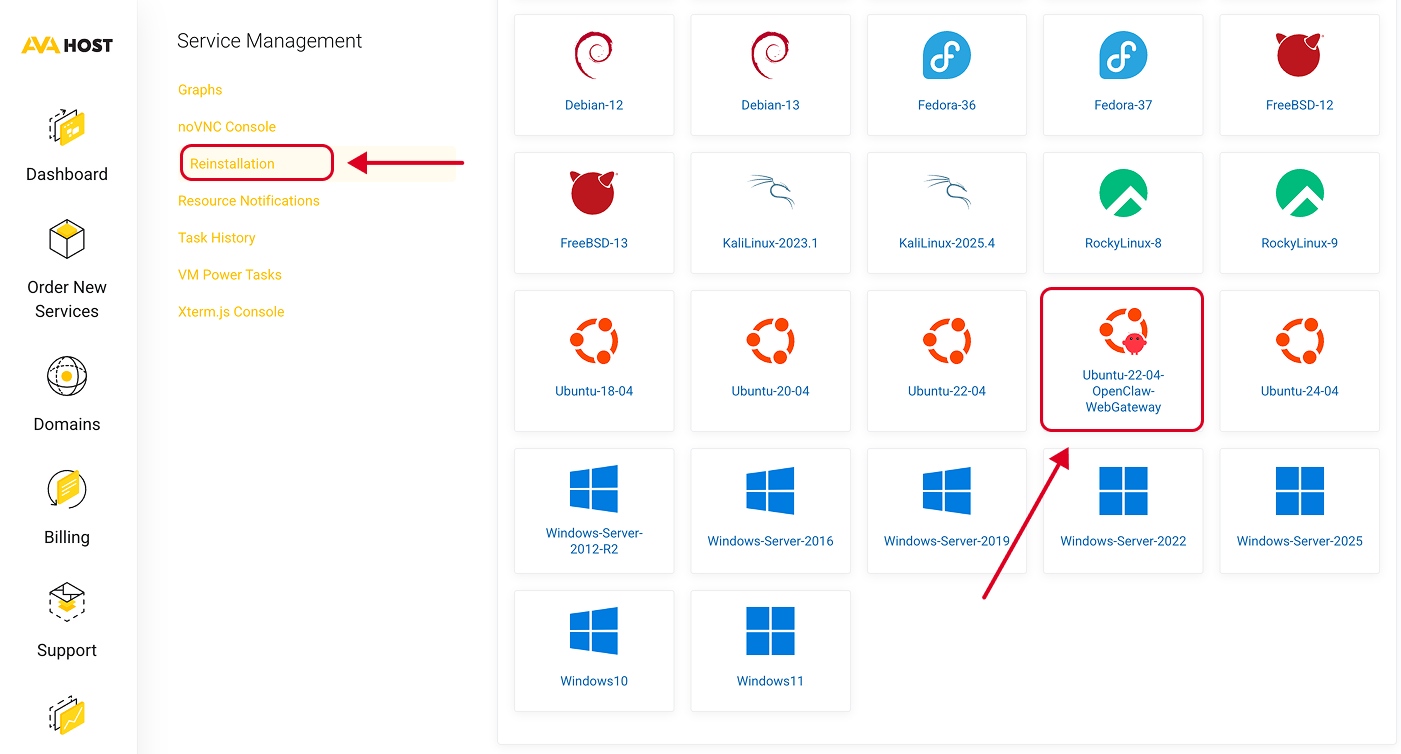
In the operating system list, find:
Ubuntu-22-04-OpenClaw-WebGateway
Click Install.
This template includes:
- Ubuntu 22.04 LTS
- Latest version of OpenClaw
- Docker
- Docker Compose
- WebGateway
- Firewall rules
Installation time:
2–5 minutes
7. Open the OpenClaw Initialization Page
After installation is complete, open the following in your browser:
http://YOUR_VPS_IP:18789
Example:
http://123.123.123.123:18789
You will see the OpenClaw setup wizard.
8. Complete the Setup Wizard
Fill in the following step by step:
1. Choose an AI Provider
- Anthropic (Claude)
- OpenAI (ChatGPT)
2. Enter Your API Key
Get your API key from the official website:
- OpenAI API Key
- Anthropic API Key
Paste it into the setup page.
3. Create an Administrator Account
Set:
- Password
4. Connect Chat Platforms
It is recommended to connect Telegram first.
9. Connect a Telegram Bot
Open Telegram.
Search for:
@BotFather
Send:
/newbot
Follow the prompts to create your bot.
You will receive:
Bot Token
Copy the token.
Inside OpenClaw:
Integrations
→ Telegram
→ Paste Token
Save the settings.
You can now open your Telegram bot and start chatting with your AI assistant.
10. Deployment Complete
Your AI assistant is now:
- Running on your VPS
- Online 24/7
- Supporting multiple platforms
- Compatible with Claude / ChatGPT
- Fully private and self-hosted
You can continue connecting:
- Slack
- Discord
- Gmail
- Google Drive
- Google Calendar
- Ollama
To build your own AI automation system.
11. Recommended For
- VPS users
- Cross-border e-commerce businesses
- Automated customer support
- AI developers
- Content creators
- Automation workflows
- Personal AI assistants
12. Recommended VPS Specifications
Minimum Requirements
- 2GB RAM
- 1 CPU Core
- 20GB SSD
Recommended Configuration
- 4GB RAM
- 2 CPU Cores
- 40GB SSD
If you plan to use local AI models, it is recommended to have:
- 8GB RAM or higher
13. Final Thoughts
OpenClaw is currently one of the most powerful self-hosted AI assistants available.
Combined with a VPS, it enables:
- Private AI
- 24/7 online operation
- Multi-platform bots
- Office automation
- No per-message charges
If you use AI frequently, OpenClaw is definitely worth deploying.