As one of the most classic and enduring solutions in the proxy networking world, Clash has gone through multiple generations of kernel evolution — from Clash → Clash Premium → Clash Meta → Mihomo — gradually building an extremely large and mature ecosystem.
Within this ecosystem, a huge number of excellent documents, subscription converters, and configuration references have accumulated over time.
However, once you start using it in real-world scenarios, you quickly realize:
documentation is not always detailed enough, tutorials tend to repeat each other, and many widely copied configuration combinations actually contain questionable design choices and hidden pitfalls.
Because of that, this article will contain many configuration choices that differ from mainstream tutorials, and I will explain the reasoning behind each one.
One thing worth emphasizing:
many Clash configuration options do not have universally “correct” answers.
Their suitability depends on multiple factors such as TUN, DNS, routing rules, and platform-specific behavior, all while balancing security and performance.
In other words, enabling an option does not automatically mean “better.”
Understanding how these features actually work is the key to building a stable and controllable proxy environment — and that is exactly the purpose of this article.
This article is based on the following environment:
- Kernel: Mihomo
- Platforms: Android / Windows
- Client: FlClash
Each section includes reference configurations along with analysis of actual behavior.
01 TUN: Transparent Proxying Is Not Free
tun:
  enable: true
  stack: mixed
  strict-route: true
  auto-route: true
  dns-hijack:
    - any:53
  mtu: 1280
  disable-icmp-forwarding: true
What TUN Is — and Why It “Looks Perfect”
There are already countless articles explaining the basics of TUN, so I will keep this brief:
- TUN is a Layer-3 virtual network interface
- System traffic is routed into this virtual interface
- Clash intercepts, analyzes, routes, and forwards the traffic
- Applications are almost completely unaware of its existence
That is why TUN is commonly referred to as a transparent proxy solution:
browsers, desktop applications, and command-line tools all work without additional proxy configuration, as if they were communicating with a real physical NIC.
But that is also where the problems begin.
strict-route and Windows Smart Multi-Homed Name Resolution
Many “DNS leak prevention” tutorials recommend:
Disable “Smart Multi-Homed Name Resolution” in Windows Group Policy.
However, this recommendation itself is problematic.
What Is Smart Multi-Homed Name Resolution?
This is an engineering-level optimization feature in Windows:
- DNS queries are sent simultaneously through all network interfaces
- The fastest response is used, or selected based on interface metrics
- The goal is to improve DNS reliability and responsiveness
Where Does the Real Problem Come From?
Many people mistakenly believe:
DNS leaks are caused by Smart Multi-Homed Name Resolution.
In reality, the root cause is the TUN behavior when strict-route = false.
When strict-route: false:
- Clash does not force all traffic into the TUN interface
- The system’s original routing table remains active
- DNS requests may simultaneously use:
- The physical NIC (direct connection)
- The Clash TUN interface
If the physical NIC responds first, the request bypasses Clash’s DNS handling logic and appears as a “DNS leak.”
Even if Smart Multi-Homed Resolution is disabled, if:
- The physical NIC supports IPv6
- IPv6 is disabled in Clash
you may still see AAAA records resolved locally during DNS leak tests, even though they were expected to resolve remotely.
strict-route = true: Not a Silver Bullet
When strict-route is set to true:
- Clash installs more aggressive routing rules
- All traffic is forced through TUN
- DNS is no longer affected by Smart Multi-Homed Resolution
At first glance, this seems to solve everything.
But new problems appear.
According to multiple related issues, when both:
strict-routeis enabled- Smart Multi-Homed Name Resolution is disabled
the following may occur:
- Refreshing a webpage no longer triggers DNS queries immediately
- Opening new pages introduces extremely severe first-packet latency
- The browsing experience becomes almost unusable
Recommended Best Practice
strict-route: true- Do NOT disable Windows Smart Multi-Homed Name Resolution (leave it at default)
- If issues appear in environments like WSL:
- Try setting
mtuto 1500 - Or use the IPv6 minimum MTU value of 1280
- Try setting
ICMP: The Hidden Cost of TUN
In TUN + fake-ip environments:
- Ping targets always resolve to addresses from the fake-ip pool
- ICMP packets are either dropped or sent to nonexistent targets
- The result is usually 100% timeout
Additionally, related issue reports show:
- Running Tailscale, certain games, or networking tools locally
- May trigger ICMP loops
- Generating tens of thousands of ICMP packets
- Causing prolonged high CPU usage
TUN is not a free lunch.
In my own configuration, I disable ICMP forwarding to avoid such problems:
disable-icmp-forwarding: true
02 DNS: The Most Complex — and Most Misunderstood — Part
dns:
  enable: true
  prefer-h3: false
  cache-algorithm: arc
  ipv6: true
  enhanced-mode: fake-ip
  fake-ip-range: 198.18.0.1/16
  fake-ip-range6: fc00::/18
  use-hosts: true
  use-system-hosts: true
  respect-rules: false
  rebind: false
  default-nameserver:
    - system
  proxy-server-nameserver:
    - system
  nameserver:
    - system
  fake-ip-filter:
    - geosite:connectivity-check
    - geosite:private
    - geosite:cn
    - +.stun.*.*
    - +.stun.*.*.*
    - +.stun.*.*.*.*
    - +.stun.*.*.*.*.*
    - "*.n.n.srv.nintendo.net"
    - +.stun.playstation.net
    - xbox.*.*.microsoft.com
    - "*.*.xboxlive.com"
    - +.msftncsi.com
    - +.msftconnecttest.com
    - +.teracloud.jp
    - +.lan
    - localhost.ptlogin2.qq.com
    - WORKGROUP
DNS is the part of Clash configuration that has the greatest impact on real-world usability — and is also the most frustrating to configure correctly.
fake-ip vs redir-host: The Core Difference
The Fake IP concept described in RFC3089 is widely considered the best practice for Layer-4 proxy routing scenarios because it offers:
- The best performance
- The best user experience
- The lowest implementation complexity
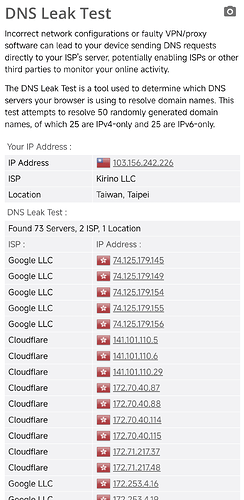
In a TUN + fake-ip environment, accessing Google works like this:
- The application requests DNS resolution for
google.com - The DNS request is hijacked by Clash
- Clash:
- Does NOT perform real DNS resolution
- Returns a fake IP such as
198.18.x.x - Creates an internal mapping
- The application connects to the fake IP
- Clash restores the original domain from the mapping table
- Outbound routing rules determine the proxy path
- The proxy server resolves the real IP remotely and establishes the connection
The key point:
the local machine never resolves Google’s real IP address.
Why fake-ip Does Not Need fallback
With properly designed rules:
- Domains are already routed during the rule-matching phase
- Requests that should remain hidden are already sent through the proxy
- Even if later IP-based rules are applied:
- Polluted DNS results will not affect the final routing outcome
Therefore, in fake-ip mode:
fallbackfallback-filter
are essentially unnecessary configurations.
Why I Choose system DNS
There are three reasons:
- Performance
- DNS pollution is irrelevant in fake-ip mode
- Local recursive DNS often returns better direct CDN endpoints faster
- LAN Compatibility
- Campus networks
- Corporate intranets
- Self-hosted DNS servers
systemDNS adapts automatically
- Rule-Based Safety Net
- Even if an incorrect IP is obtained in extreme cases
- The routing rules will still handle it correctly
The Natural Weaknesses of redir-host
In redir-host mode:
- The local machine must perform real DNS resolution
- fallback mechanisms are required to prevent DNS pollution
- Real DNS leakage becomes possible
- An extra DNS round-trip delay is introduced
- If sniffing fails, domain information is lost
In extreme cases, traffic may even become:
Beijing → resolve a Beijing CDN locally → send traffic to a US proxy → route back to Beijing
fake-ip completely avoids this problem.
fake-ip-filter: Necessary Exceptions
The following scenarios are unsuitable for fake-ip:
- STUN / P2P
- LAN discovery
- NTP
- Certain games and device discovery protocols
Using geosite-based matching is highly recommended because it:
- Reduces omissions
- Improves stability
- Avoids conflicts
- Makes troubleshooting easier
About Sniffing (sniff)
The main purpose of sniffing exists for redir-host:
- Extracting SNI information from TLS ClientHello
- Recovering domain information
But in fake-ip environments:
- The domain mapping table already exists
- Sniffing merely “reconfirms already known information”
- It may even break services such as FCM
The combination of fake-ip + sniff is generally not recommended.
prefer-h3: Why I Disable It
The official documentation already discourages combining:
prefer-h3respect-rules
Additionally:
- QUIC may randomly drop packets during peak hours
- Real-world experience is not always better than HTTP/2
- Stability may actually become worse
Therefore, I choose to disable it.
Additional Browser Behavior Notes
Browsers such as Chrome may enable:
- Built-in DNS
- DoH (DNS over HTTPS)
In fake-ip environments:
- These are unnecessary
- They may even reduce performance
It is recommended to disable them.
03 Routing Rules
I recommend using the rule sets maintained by skkmoe for several reasons:
- CDN and download traffic can be routed separately to lower-cost nodes
- REJECT-DROP rules prevent repeated retries for ad domains
- Higher rule accuracy and targeted optimization
- Dedicated groups for AIGC services
- Fixes random Telegram IP issues on macOS
Important:
Always place domain rules before IP rules.
Otherwise, unnecessary DNS resolution, performance degradation, and additional DNS risks may occur.
04 Miscellaneous Notes
WebUI
FlClash itself provides a solid user experience, but:
- Logs
- Connection inspection
are still relatively limited, and the author currently has no plans for major improvements.
You can enable Mihomo’s official WebUI:
- FlClash → Basic Configuration
- Enable “Find Process”
- Enable External Controller
- Open the WebUI in your browser
This is extremely useful for troubleshooting.
FCM
The official documentation states:
FCM cannot work through network proxies.
I believed this for a long time and always kept FCM on direct connection.
However, recent testing shows:
- Some proxy nodes can maintain stable FCM connections
- tcp-keep-alive is forcibly disabled on Android
- Actual performance degradation is minimal
Chinese Android ROM power-saving policies still disconnect background services when the screen is off, and without root access there is currently no real solution.
However, while the screen is on, Passkey authentication, verification notifications, and similar features are now mostly usable.