Many users encounter the same problem after purchasing a BandwagonHost VPS for the first time: the server is ready, but they don’t know how to use it. SSH won’t connect, website setup is confusing, Docker installation fails, firewall configuration is unclear, and websites may not load. In the past, solving these issues required searching tutorials or submitting support tickets, but things are much easier now.
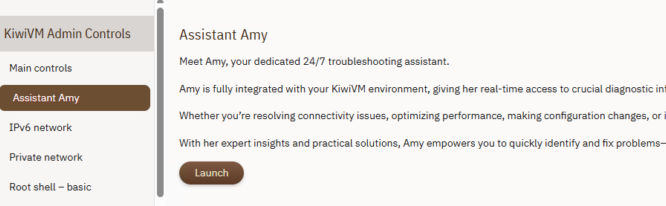
BandwagonHost has introduced a built-in AI assistant called Assistant Amy in the KiwiVM control panel. It supports Chinese communication, can directly read the current VPS status, and provides recommendations based on your actual server environment. For beginners, Amy works like an always-online VPS operations assistant.
Many tasks that previously required manual Linux commands or documentation reading can now be completed with a simple question.
Below are the 10 most practical and commonly used scenarios for beginners.
BandwagonHost official website:
https://bandwagonhost.com/
1. Use Amy to troubleshoot SSH connection failures
SSH connection failure is one of the most common issues for VPS beginners.
Typical causes include:
- Incorrect IP address
- SSH port changed
- Firewall blocking access
- SSH service failure
- Wrong root password
- System boot issues
Previously, users often didn’t know where to start troubleshooting.
Now you can simply open Amy in KiwiVM and type:
My VPS SSH is not working, please help me troubleshoot it
Amy will automatically check:
- Whether the VPS is online
- SSH service status
- Open ports
- Firewall rules
- System health status
Then it will explain the issue and provide step-by-step solutions.
This is especially useful for users with no Linux experience.
2. Diagnose slow VPS performance with Amy
Many users test VPS speed immediately after purchase, but slow performance can have multiple causes.
For example:
- Improper routing for your region
- High CPU usage
- Insufficient memory
- Network congestion
- Misconfigured applications
- Routing detours
You can ask directly:
Why is my VPS so slow?
or:
Check my VPS network and system load
Amy will analyze:
- CPU usage
- Memory usage
- Network traffic
- System load
- Disk I/O status
It will then explain where the issue likely comes from.
3. Step-by-step website setup guidance
Many users buy a BandwagonHost VPS mainly to build websites such as blogs, WordPress sites, or business pages.
However, beginners often don’t know how to proceed with a fresh Linux system.
Common questions include:
- What environment should I install?
- Nginx or Apache?
- Should I use a control panel like Baota?
- How to configure domain DNS?
- How to enable HTTPS?
You can ask Amy directly, for example:
I want to build a WordPress website. How do I start?
Amy will provide a full deployment plan including:
- Recommended environment
- Software installation
- Database setup
- Domain configuration
- SSL setup
- Website verification
This effectively acts as an AI website deployment assistant.
4. Install Docker, Nginx, Node.js, and other environments
Installing server environments is one of the biggest challenges for beginners.
Common components include:
- Docker
- Nginx
- MySQL
- Python
- Node.js
- Redis
Instead of searching commands manually, you can simply ask Amy.
Install Docker for me
or:
Deploy an Nginx environment
Amy will handle the installation process and verify completion.
5. Check VPS resource usage in one sentence
Users often want to know:
- CPU usage
- Remaining memory
- Disk usage
- Traffic consumption
Instead of checking multiple panels, just ask:
Show my VPS resource usage
Amy will summarize:
- CPU usage
- Memory usage
- Swap usage
- Disk space
- Network traffic
- System load
This is much clearer than manual inspection.
6. Security checks and vulnerability scanning
Many VPS users do not configure security after installation.
This may lead to:
- Weak passwords
- Exposed ports
- Software vulnerabilities
- SSH risks
- Outdated system packages
You can ask Amy:
Scan my system for security risks
Amy will suggest improvements such as:
- System updates
- Disabling root login
- Closing dangerous ports
- Enabling Fail2Ban
- SSH hardening
7. Firewall and port management
A common issue is websites not loading due to closed ports.
Examples:
- Port 80 not open
- HTTPS port 443 blocked
- Docker port mapping failure
You can ask Amy:
Open ports 80 and 443
or:
List all open ports
Amy will adjust firewall rules accordingly.
8. System reinstall guidance
Sometimes users break their system while experimenting.
Common concerns:
- Debian or Ubuntu?
- Is CentOS still usable?
- What to do after reinstall?
- How to initialize the server?
You can ask Amy:
Which Linux distribution should I choose for reinstall?
or:
What should I do after a fresh system install?
9. Traffic and bandwidth monitoring
BandwagonHost plans usually include monthly traffic limits.
Users often ask:
- How much traffic have I used?
- How much is left?
- Am I close to the limit?
You can simply ask:
Show my current traffic usage
Amy will return:
- Used traffic
- Remaining traffic
- Bandwidth status
- Traffic statistics
10. SSL certificate and HTTPS setup
Modern websites require HTTPS, but SSL setup can be difficult for beginners.
Common issues include:
- How to get free SSL?
- How to configure Let’s Encrypt?
- DNS configuration issues?
- Why HTTPS is not working?
You can ask Amy:
Configure SSL for my website
or:
How do I point my domain to the VPS?
BandwagonHost Assistant Amy FAQ
1. Does Assistant Amy support Chinese?
Yes. You can communicate with Amy in Chinese directly.
2. Can Amy directly operate the VPS?
Some operations can be executed, such as installations, port management, and system checks. High-risk actions usually require confirmation.
3. Where do I access Amy?
It is available inside the KiwiVM control panel.
4. Can Amy replace Linux learning?
No, but it significantly lowers the learning curve for beginners.
5. Which VPS plan is recommended for beginners?
The CN2 GIA-E series is generally recommended due to stability and performance.
BandwagonHost VPS Plan Recommendations
| Plan | RAM | CPU | Storage | Traffic | Bandwidth | Datacenter | Price | Link |
|---|---|---|---|---|---|---|---|---|
| KVM Entry | 1GB | 2 cores | 20GB | 1TB | 1Gbps | DC2 AO / DC8 ZNET | $49.99/year | Buy |
| KVM Standard | 2GB | 3 cores | 40GB | 2TB | 1Gbps | Multiple | $99.99/year | Buy |
How to choose a BandwagonHost plan?
Beginners
Choose KVM plans for learning and basic use cases.
Main users
CN2 GIA-E is recommended for stability and performance.
Advanced users
Hong Kong CN2 GIA or Osaka CN2 GIA are ideal for enterprise and low-latency requirements.
Conclusion
The biggest challenge for VPS beginners is not purchasing the server, but learning how to use it.
Assistant Amy significantly reduces the learning curve by providing real-time guidance.
Tasks such as SSH troubleshooting, Docker installation, WordPress setup, SSL configuration, firewall management, and system checks can now be handled through simple chat interactions.
For new BandwagonHost users, this saves a significant amount of time and effort.