In cloud computing environments, a single ECS (Elastic Compute Service) instance usually comes with only one public IP address by default. However, if you need to run multiple independent applications on the same server — and each application requires its own dedicated public IP — you’ll need to bind multiple public IPs to the ECS instance.
Alibaba Cloud International Edition makes this possible through the combination of Secondary Elastic Network Interfaces (ENI) and multiple Elastic IP Addresses (EIP). This tutorial will walk you through the complete setup process step by step, while also introducing how CloudHub Global can help you open an Alibaba Cloud International account without a foreign credit card, along with better pricing and technical support.

1. Why Choose CloudHub Global?
CloudHub Global is an officially certified Alibaba Cloud International reseller that helps users access Alibaba Cloud International services without requiring an overseas credit card.
1. Privacy & Security
CloudHub Global is an official partner of multiple international cloud providers and offers standardized official cloud products directly. Users are not required to submit unnecessary private information, making it ideal for businesses that value operational independence and lower risk exposure.
2. Hassle-Free Payments
Supports agent-assisted payment, USDT, and multiple currencies — no overseas credit card or foreign phone number required.
3. Better Pricing
As a top-tier reseller channel, CloudHub Global often provides discounts lower than official public pricing, helping significantly reduce cloud infrastructure costs.
4. Comprehensive Technical Support
Provides network optimization advice, troubleshooting, and architecture consultation for Alibaba Cloud, Tencent Cloud, Huawei Cloud, AWS, GCP, Azure, and other international cloud platforms.
2. Complete Guide: Binding Multiple Public IPs to One ECS Instance
Before starting, prepare the following resources:
Prerequisites
- An ECS instance that supports secondary Elastic Network Interfaces (ENI)
You can verify ENI support in the ECS instance specification details. - A pre-created secondary ENI
- Must be in the same VPC as the ECS instance
- Must belong to the same Availability Zone
- Security group rules must allow public internet access
- Multiple Elastic Public IPs (EIPs)
Each public IP must be purchased separately.

Important: This process involves network restarts and routing changes. It is strongly recommended to perform the operation during off-peak business hours.
Step 1: Create a Secondary ENI and Attach It to the ECS Instance
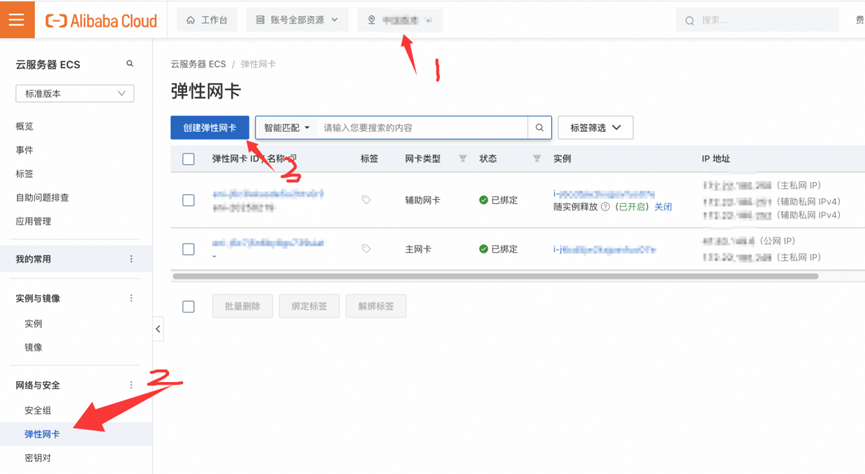
- Log in to the Alibaba Cloud ECS Console
- Navigate to: Network & Security → Elastic Network Interfaces (ENI)“`
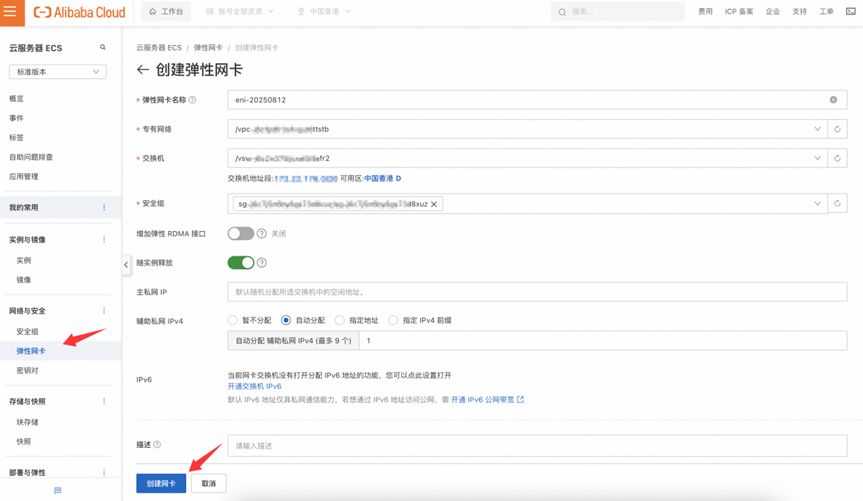
“` - Create a new ENI
- You need one secondary private IP for each EIP you plan to bind
“`
“` - After creation, click Attach Instance
- Select the target ECS instance and confirm the attachment
Tip:
For certain ECS instance types, the server must be in a Stopped state before attaching a secondary ENI.
Once the status changes to Attached, the operation is successful.
Step 2: Bind Multiple EIPs to Secondary Private IPs
- Log in to the Alibaba Cloud Elastic IP Console
- Find the target EIP and click Bind Resource
- Configure the following options:
- Instance Type: Select Elastic Network Interface (very important)
- Resource Group: Choose the group containing the secondary ENI
- Binding Mode: Standard Mode
- Select Instance: Choose the private IP associated with the secondary ENI created in Step 1
If you have multiple EIPs, simply repeat this process to achieve:
One ECS Instance → Multiple EIPs
3. Additional Network Configuration After Binding
1. Some Systems May Not Automatically Detect Secondary ENIs
If the ECS instance does not recognize the secondary ENI automatically, you may need to:
- Manually configure the network interface files
- Or manually add routing rules
(Configuration methods vary by operating system. It is recommended to follow Alibaba Cloud’s official documentation.)
2. If the Application Provides Public Services
For services such as websites or APIs:
No additional routing configuration is usually required. External traffic will flow directly via:
EIP → ENI → ECS
3. If the ECS Initiates Outbound Internet Connections
You may need to configure:
- Custom default routes
- Or multi-NIC load balancing policies
Depending on your requirements, you can choose to:
- Route specific traffic through designated NICs
- Or distribute outbound traffic across multiple NICs
4. EIP Quotas and Expansion
Alibaba Cloud International Edition provides a default quota of 20 EIPs.
If you require more public IPs, you can submit a quota increase request.
You can also contact CloudHub Global for assistance with quota expansion.
Conclusion
By combining secondary ENIs with multiple EIPs, you can easily enable a single ECS instance to use multiple public IP addresses simultaneously, meeting the needs of multi-application deployments with independent public network access.
By choosing CloudHub Global, you can also enjoy:
- No overseas credit card required
- Lower pricing and exclusive discounts
- Agent-assisted payments and USDT support
- 24/7 technical support
Making cloud deployment simpler, lighter, and more efficient.
If you need Alibaba Cloud International account registration, recharge assistance, or technical support, contact CloudHub Global:
🔗 https://www.cloudhubglobal.com
📨 Telegram: @yunshuguoji