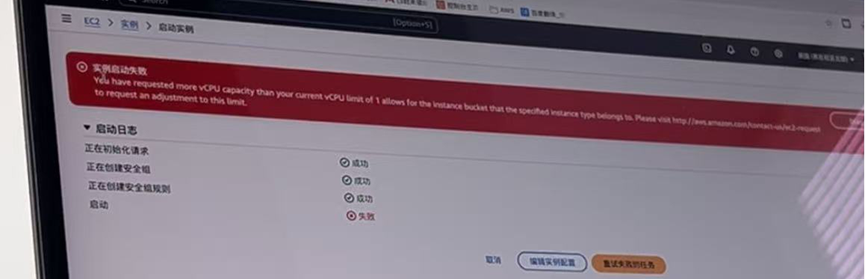
When using AWS (Amazon Web Services), many users encounter a common issue — insufficient service quotas. This usually happens with new accounts where available resources are limited, such as EC2 instance count or total vCPU quotas.
Properly managing service quotas not only ensures smooth business scaling but also helps avoid unnecessary costs caused by resource over-provisioning.
This article explains what AWS service quotas are, how to increase them, and how CloudHub Global (AWS authorized reseller) can help you resolve quota limitations quickly and efficiently.

1. Why Choose CloudHub Global?
As an AWS authorized reseller, CloudHub Global (www.cloudhubglobal.com) is committed to helping enterprises and developers use international cloud services more efficiently.
By choosing CloudHub Global, you gain the following advantages:
1. Privacy & Security
CloudHub Global is an authorized partner of major cloud providers including AWS, GCP, and Azure. All accounts are independently created and dedicated to users. No personal data is shared, ensuring secure deployment for enterprise and personal projects.
2. Flexible Payments
Supports multiple payment methods including USDT, RMB, and multi-currency payments. Users can activate services via reseller top-up without requiring overseas credit cards or foreign phone numbers, significantly lowering the entry barrier.
3. Competitive Pricing
As a core distribution partner of global cloud providers, CloudHub Global offers discounted pricing lower than official rates, helping businesses significantly reduce cloud computing costs while maintaining performance.
4. Technical Support
The CloudHub team has extensive experience across AWS, Alibaba Cloud, Tencent Cloud, Google Cloud, and Microsoft Azure. They provide solution design, deployment optimization, and after-sales support to help customers quickly launch services.
5. Account Stability
Accounts opened via official reseller channels are independent, secure, and have lower risk controls. They support long-term renewal and are suitable for enterprise production environments, cross-border e-commerce systems, and AI workloads.
2. What Are AWS Service Quotas?
AWS Service Quotas (formerly known as Service Limits) define the maximum number of resources allowed per account.
These limits help prevent accidental overuse of resources and ensure system stability across AWS infrastructure.
Common quota types include:
- Number of EC2 instances or total vCPUs
- Number of S3 buckets
- Number of RDS database instances
- Number of VPCs and subnets
Each AWS account has separate quotas per region. When exceeding limits, you may see messages such as:
- “You have exceeded your limit for the resource.”
- “You’ve reached the maximum number of instances for your account.”
At this point, you need to request a quota increase via the AWS console or support channels.
3. How to Check Your Current Quotas
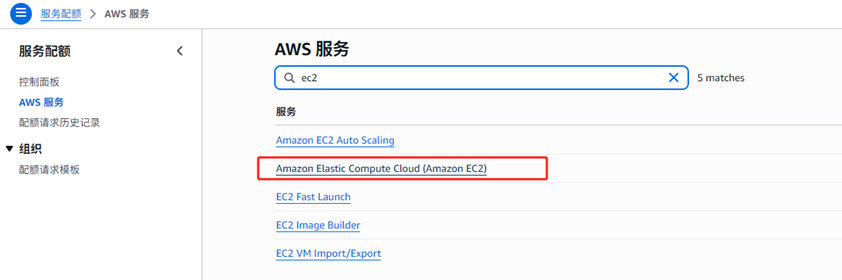
- Log in to the AWS Management Console
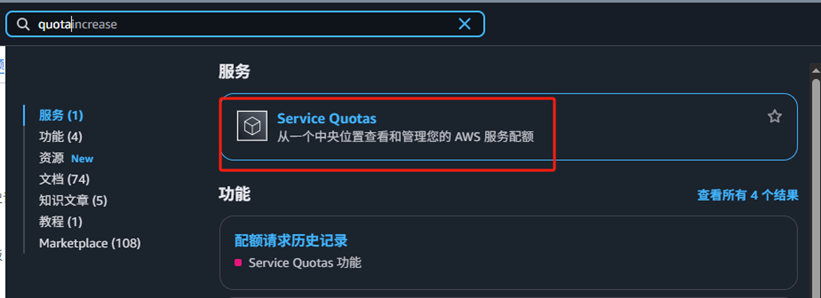
- Search for “Service Quotas” in the top search bar
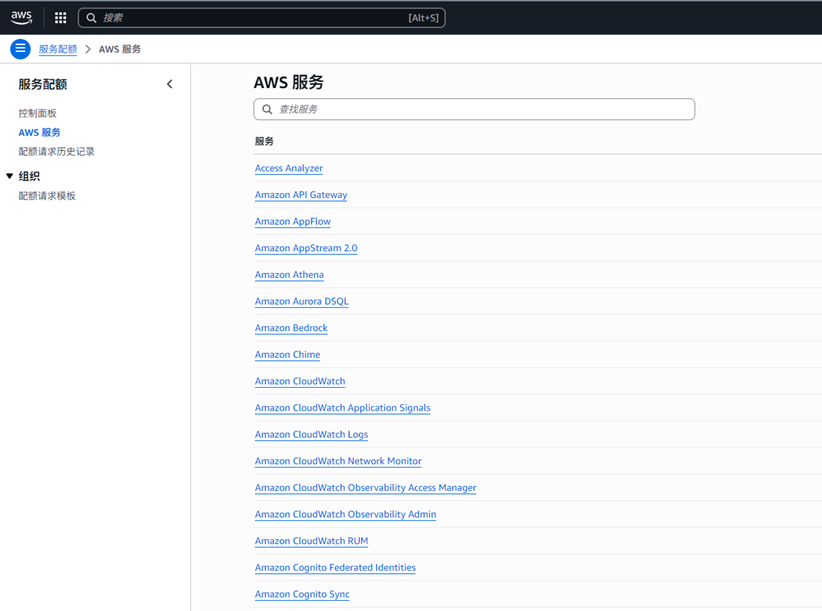
- Select “AWS services” from the left menu
- Choose the service (e.g., Amazon EC2)
- View current quota limits
- Switch regions in the top-right corner to view region-specific quotas
4. Example Quota Increase Process — EC2 Instances
EC2 is one of the most commonly requested services for quota increases, especially vCPU limits.
Steps:
- Log in to AWS Console and open Service Quotas
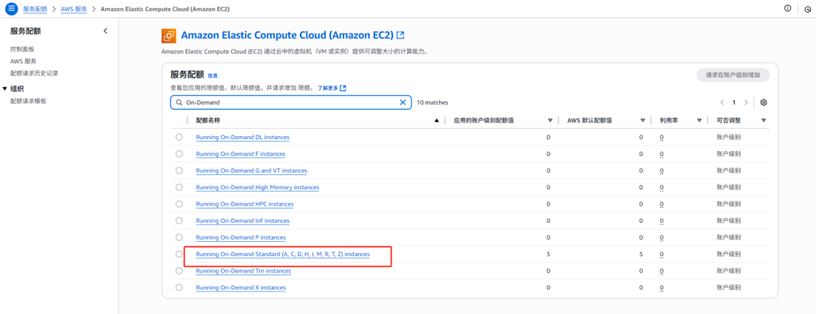
- Select Amazon Elastic Compute Cloud (EC2)
- Search for “On-Demand” and locate Running On-Demand Standard Instances
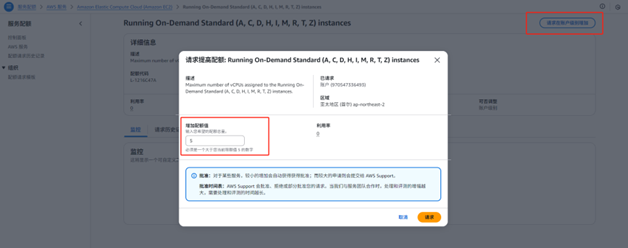
- Click “Request quota increase”
- Enter the desired quota value (e.g., increase from 5 vCPU to 64 vCPU)
- Submit the request and wait for AWS review
Recommendations:
- Initial quota increases to 64 vCPU are usually approved faster.
- Very high requests may require business justification and manual review.
AWS accounts opened via CloudHub Global reseller channels typically experience smoother approval processes, with technical consultants assisting in writing request descriptions to improve success rates.
5. Summary & Recommendations
AWS service quotas are an important mechanism to ensure safe and stable resource usage.
With a standard AWS account, you typically need to bind an overseas credit card and complete identity verification. However, accounts opened via CloudHub Global reseller channels offer additional convenience:
- No credit card required for account creation
- Supported prepaid top-up services
- Assisted quota increase requests
- Professional technical support
CloudHub Global helps users access AWS cloud services with lower barriers and higher efficiency, enabling businesses to focus on innovation without worrying about payment or quota limitations.
Contact Us
For AWS international account setup or quota increase assistance:
🌐 Official Website: https://www.cloudhubglobal.com
📢 Telegram Support: @yunshuguoji
Let CloudHub Global help you easily go cloud and build an efficient, secure, and compliant global cloud computing journey.