In today’s internet environment, network quality directly impacts user experience. This is especially critical for server operations, cloud computing, and cross-border businesses where accurate network testing is essential. The release of NetQuality fills a gap in high-precision network diagnostic tools, making it a reference-level benchmarking script.
1. Introduction to NetQuality
NetQuality is a Bash-based script designed for network engineers, server administrators, and users with high network quality requirements. It provides a comprehensive suite of tests, including:
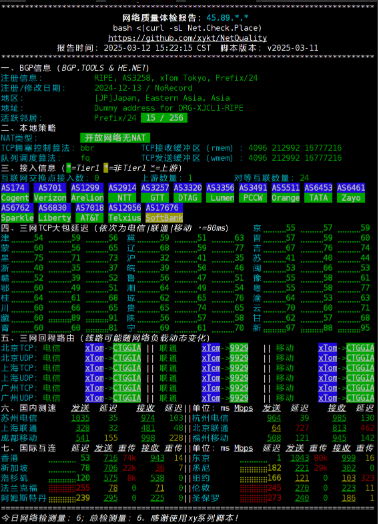
BGP information, local policy analysis, connectivity insights, TCP latency (large packet), return route tracing, domestic speed testing, and global connectivity, covering seven major modules. It also supports dual-stack IPv4/IPv6 queries.
Additionally, NetQuality features a well-formatted output with optimized terminal display, making results easy to read across multiple environments. It also supports JSON output for big data analysis and flexible result processing.
2. Key Features of NetQuality
- BGP Information Lookup: Uses BGP.TOOLS and HE.NET databases to analyze upstream and connectivity details.
- Local Policy Detection: Analyzes NAT type, TCP congestion control, and queue scheduling algorithms.
- Connectivity Analysis: Displays upstream providers, peering relationships, and IX connections.
- TCP Latency Test (Large Packets): Measures latency for China Telecom, China Unicom, and China Mobile.
- Return Route Analysis: Traces routing paths under different network conditions.
- Domestic Speed Test: Based on Speedtest.net, covering major cities in mainland China and the Greater Bay Area.
- Global Connectivity Test: Tests latency and bandwidth across five continents.
Flexible Execution Parameters
NetQuality provides multiple modes to suit different needs:
- Default dual-stack test:
bash <(curl -Ls Net.Check.Place) - IPv4 only:
bash <(curl -Ls Net.Check.Place) -4 - IPv6 only:
bash <(curl -Ls Net.Check.Place) -6 - Latency-only mode:
bash <(curl -Ls Net.Check.Place) -P - Low data mode:
bash <(curl -Ls Net.Check.Place) -L - Skip sections:
bash <(curl -Ls Net.Check.Place) -S 1234567 - JSON output:
bash <(curl -Ls Net.Check.Place) -j - Auto-install dependencies:
bash <(curl -Ls Net.Check.Place) -y - Full IP report:
bash <(curl -Ls Net.Check.Place) -f
3. Supported Operating Systems
NetQuality is compatible with most mainstream Linux distributions and macOS, including:
- Debian / Ubuntu / Linux Mint
- Fedora / CentOS / RHEL / AlmaLinux / Rocky Linux
- Arch Linux / Manjaro
- Alpine Linux
- SUSE Linux / openSUSE
- Alibaba Cloud Linux / Anolis OS
- Void Linux
- macOS
4. Why Choose NetQuality?
Compared to other network testing tools, NetQuality offers the following advantages:
- High Accuracy: Uses authoritative databases (BGP.TOOLS & HE.NET) for real network topology data.
- Clean and Readable Output: Optimized terminal display for easy interpretation and sharing.
- Highly Flexible: Customizable testing modules and execution modes.
- Open Source: Transparent and secure with publicly available code.
- JSON Support: Ideal for automation, storage, and visualization.
5. Installation and Usage
NetQuality requires no installation. Simply run:
bash <(curl -Ls Net.Check.Place)
To test only IPv4 or IPv6:
bash <(curl -Ls Net.Check.Place) -4  # IPv4 only
bash <(curl -Ls Net.Check.Place) -6  # IPv6 only
Open Source Repository:
GitHub Project Link
Example Output:
6. Development and Contributors
NetQuality was developed over several months with a focus on accessibility, performance, and robustness.
- Lead Developer: xy楼主Dev
- Special Thanks:
7. Conclusion
NetQuality aims to provide the technical community with a free, open-source, and reference-grade network diagnostic tool. Whether you are a system administrator, IDC provider, or VPS reviewer, NetQuality helps you obtain accurate network performance data.
If you are interested in network testing, give NetQuality a try and experience professional-grade benchmarking!
Reference:
[First Release] Reference-Level Network Quality Diagnostic Script