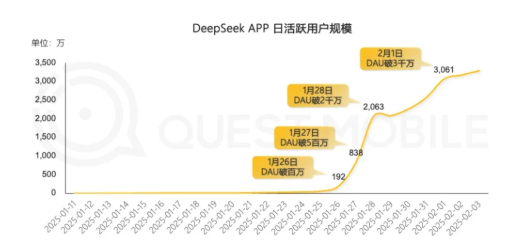
Recently, many users reported that DeepSeek servers are often busy, making it difficult to use the service normally. Although DeepSeek’s daily active users surpassed Doubao for the first time on January 28 and exceeded 30 million on February 1, becoming the fastest app to reach this milestone in history, server pressure has increased accordingly. Users often experience interruptions during queries, affecting the overall experience.
To address this issue, we have compiled three free alternatives that allow you to continue enjoying similar functions even when DeepSeek is busy.
1. Meta AI Search

Website: https://metaso.cn/
Meta AI Search offers a feature called “Long Think R1”, which can serve as an alternative to DeepSeek for deep search and analysis. Simply enable this feature to enjoy a DeepSeek-like experience.
2. Nano AI Search APP
Download: https://www.n.cn/app
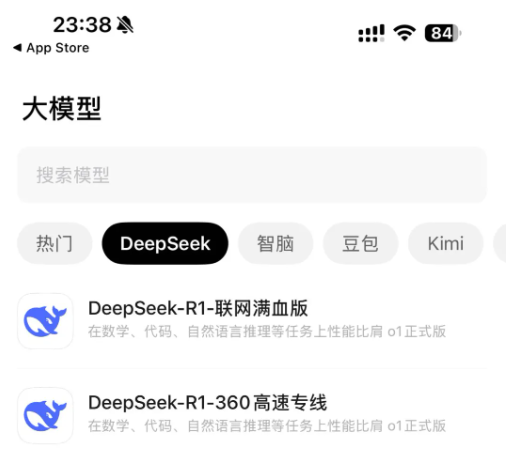
The Nano AI Search APP includes DeepSeek AI functionality, allowing users to select and use DeepSeek directly within the app. This app covers mobile devices, making it convenient to use anytime, anywhere.
3. DingTalk APP

If you use DingTalk for daily work, you can access DeepSeek through its AI assistant feature. Simply click the AI assistant icon on the right side of the search box and select DeepSeek to start using it.
These three alternatives cover web, mobile, and desktop clients, ensuring that you can smoothly use DeepSeek-like features in different scenarios. If you know of other free alternatives, feel free to share them in the comments section!
FAQ
Q: What alternatives can I use when DeepSeek servers are busy?
A: You can try Meta AI Search, Nano AI Search APP, or the DeepSeek feature in DingTalk APP.
Q: How do I use DeepSeek functionality in Meta AI Search?
A: Open the “Long Think R1” feature in Meta AI Search to use a service similar to DeepSeek.
Q: How can I download the Nano AI Search APP?
A: You can download it via https://www.n.cn/app.
Q: How is DeepSeek integrated into DingTalk APP?
A: In DingTalk, click the AI assistant icon on the right side of the search box, then select DeepSeek to start using it.